




If a client pays late this week, what happens to payroll on Friday? For most of the small business owners I work with, that’s not hypothetical. A vendor misses a delivery, a key employee goes on leave, an invoice doesn’t clear on time; these things happen all the time.
A business contingency plan in place helps you stay sane and tells you what to do next. Most business plans focus on how the business should run when things go right and miss out on what happens when they don’t.
In this blog, I’ll break down how to create one in a short working session, based on risks I’ve seen small businesses run into.
What is a business contingency plan?
The contingency planning definition you’ll see varies depending on context. In federal preparedness frameworks like FEMA’s, it’s broader and includes physical disaster response. In a business setting, especially for small businesses, it’s narrower: a written document that handles one specific operational risk at a time.
A contingency plan isn’t the same as a few other things people often confuse it with.
It’s not a general risk register, and it’s not insurance. Insurance covers losses after the fact, while a contingency plan tells you what to do in the moment it happens. It’s also narrower than a business continuity plan, and different from a crisis plan. The three terms get used interchangeably, but they’re built for different situations.
Why does your small business need a contingency plan?
About 40% of small businesses never reopen after a major disaster, according to FEMA preparedness research cited across federal disaster guidance. The problem the number points to isn’t the disaster itself. It’s the lack of a clear response when one happens.
That’s the cost of not having one. Here’s what having one actually does for you.
Safeguards revenue when it’s most vulnerable
If a customer is slow to pay or stops paying altogether, a planned reaction (speed up receivables, put a hold on discretionary spending, draw down on the line of credit) can prevent a short-term cash crunch. The plan speeds up the reaction.
Reduces downtime
When the lights go out, even a couple of days of floundering can lead to revenue loss, broken promises, and damaged relationships. Having a contingency plan reduces that time, replacing blind guesses with the next three phone calls.
Protects your financial commitments
You have to pay the loan, lease, and payroll, and they have hard deadlines. Missing them triggers penalties, breaches loan covenants, and damages relationships with the people you’ll need to call when you’re scaling. A plan helps you act early instead of reacting after the damage shows up on a bank statement.
Stabilizes your team
Uncertainty spreads fast in small teams because decisions are concentrated in a few people. When roles and actions are already written down, each person knows their responsibility, what needs to happen first, and who makes the call on key decisions.
Each of these benefits matters more for small businesses than for larger ones, because the margin for error is thinner.
That’s what makes the numbers more serious. JPMorgan Chase Institute research found that half of all small businesses hold fewer than 15 cash buffer days. For small restaurants, the typical buffer is 16 days. For professional services, it’s about 31. None of those numbers leaves much room to figure things out under pressure.
A contingency plan turns that limited window into a clear sequence of decisions instead of a scramble. The SBA’s disaster preparedness guidance points to the same pattern: businesses that recover faster are the ones that defined their response before they needed it.
How to create a contingency plan for your business (6-step framework)
This isn’t a months-long project. Here’s how I’d walk you through it.
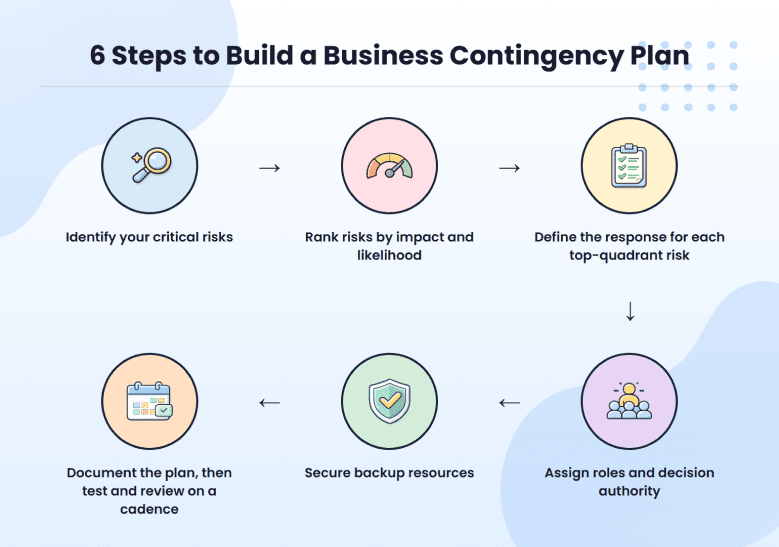
Step 1: Identify your critical risks
A contingency plan only covers risks that create immediate operational pressure: things that could stop revenue, block delivery, or create a decision bottleneck within the next 30 to 60 days.
Most founders I work with start this step too broadly. They list everything from “economic slowdown” to “team burnout” and end up with 40 risks they can’t possibly plan for.
Run each potential risk through three filter questions:
- If this happens, does revenue stop, slow, or become uncertain within 30 to 60 days?
- Does this block deliver to customers?
- Is there a team decision blocker where this is the only person or resource needed?
If it’s no for all three, it isn’t a contingency risk. Write it down and watch it.
“Market downturn” and “rising costs” sound risky, but they don’t make the cut. They’re not actionable, and they don’t have a trigger. Consider “largest client, which accounts for 30% of revenue, pauses work” or “invoices remain unpaid for 45 days.” There’s a trigger, a timeframe, and a response.
Step 2: Rank risks by impact and likelihood
Step 1 gave you a list of 8 to 15 risks that pass the filter. Step 2 narrows that list down to the few that actually need a written response plan, because writing a detailed response for every risk on the list is how contingency plans become 40-page documents nobody reads.
Score each risk on two factors:
- Impact: If it occurs, how much will it affect sales, operations, or cash flow? (1 = barely noticeable, 5 = existential)
- Probability: How likely is it in 6-12 months? (1 = improbable, 5 = expect it)
Multiply the two. Put the results on a 2×2 grid with impact on the vertical axis and likelihood on the horizontal axis. The risks that fall into the top-right quadrant (high impact, high likelihood) are the ones we plan a response for in Step 3. Everything else gets noted in your risk register and reviewed quarterly.
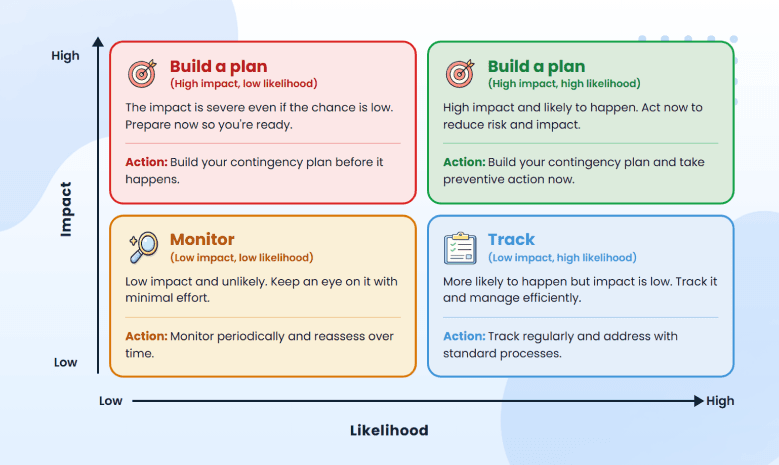
The mistake I see most often is treating every risk as equally urgent. An office internet outage is likely but low-impact (you grab a hotspot, work continues). A top client representing 30% of revenue walking is unlikely in any given month, but catastrophic when it happens. The second one is what your contingency plan is for. The first one is what your IT support contract is for.
Aim for 3 to 5 risks in the top-right quadrant. If you’re sitting on 10 or more “high priority” risks, you haven’t narrowed enough. Go back through and ask which ones would genuinely force immediate action versus which ones are just things you’re worried about.
Step 3: Define the response for each top-quadrant risk
This is the step where you have to turn the matrix into action. For each risk in the top-right quadrant, you’re defining 3 to 5 specific things you’ll do in the first 24 hours when the trigger hits.
The prompt I use with founders: if this happens at 9 am on a Tuesday, what are the first three phone calls? Be that specific. This will remove the hesitation that costs you the first day when something breaks.
Take a cash shortfall. The version most teams write looks something like this: Review finances. Adjust operations. Improve sales.
Compare it to a version that actually helps when payroll is at risk on Friday: Freeze all non-essential spending within 24 hours. Contact every client with unpaid invoices and set 7-day follow-ups. Reforecast cash flow for the next 8 weeks. Pause hiring and contractor expansion.
Now, take a key employee suddenly become unavailable. The version most teams write: Reassign their tasks across the team.
The version that holds up under a real exit: Transfer all active client accounts to a named backup within 48 hours. Share the tool and file access with the backup owner the same day. Document ongoing work status within 3 days. Notify affected clients with revised timelines.
If you handed this to someone outside your immediate team, could they act on it without asking you a single question? If the answer is no, the step is still too vague.
Step 4: Assign roles and decision authority
Step 4 names the people. For each top-quadrant risk, you’re assigning two things: a single owner who activates the plan, and a clearly defined scope of what that owner can decide without checking with anyone.
In small businesses, the default failure mode is that every decision routes through the founder. That works in normal operations, but during a disruption, it creates exactly the bottleneck the contingency plan was supposed to prevent. People wait for direction. The clock keeps running.
For each risk, name a single owner. In a 10-person team, the same person will own multiple plans, and that’s fine. Then define decision authority: who can approve spending and up to what dollar amount, who communicates with clients or vendors, and who can shift the team’s priorities without waiting for sign-off.
| Risk | Owner | Decision authority |
| Major client leaves | Founder | Approve discounts up to 20%, pause hiring, and reallocate team capacity for up to 6 weeks without additional approval |
| Vendor failure | Operations lead | Switch to a pre-qualified alternate vendor and approve cost increases up to $10,000 without checking in |
The mistake I see most often is assigning ownership without authority. The owner ends up needing to check before every decision, which means the plan moves at the speed of whoever’s signing off, not at the speed the disruption requires. Naming someone the owner is one decision. Giving them the authority to act is the second one.
Step 5: Secure backup resources (funds, systems, people)
Start with cash, because most disruptions turn into cash problems within the first 30 days. The math is simple:
Monthly operating expenses × number of months of runway = target reserve
Take a 6-person professional services firm with about $40,000 in monthly operating expenses. To hit a 3-month buffer, the target reserve is $120,000. For most small businesses of that size, the actual cash on hand is a fraction of that target, and that gap is exactly what the contingency plan is meant to manage.
The point of the math isn’t to make you feel behind. It’s to define the gap, so you can build toward it on a rolling 13-week cash flow forecast instead of hoping the runway works out.
Then move to operational backups, which is where most plans get vague.
- Vague version: Backup vendor on standby.
- Useful version: Vendor A (primary): contact, pricing, lead time. Vendor B (backup): contact, pricing differential, lead time, last verified [date].
The backup is only real if you’ve actually contacted them, agreed on terms, and confirmed they’d take the call.
Same logic for people. “Team backup” means nothing. What you need is a sentence per critical role: if [name] is unavailable, [name] takes over [specific responsibilities]. If a single role on your team has no answer to that sentence, that’s a risk you haven’t solved.
Founders sometimes assume a backup exists when nobody has tested whether it’s usable. The question to ask of every backup resource on your list: if I needed this tomorrow, could I actually access it without making three phone calls and waiting two days?
If the answer is no, it’s not a real backup yet.
Step 6: Document the plan, then test and review on a cadence
Write it down: one page per risk, with the trigger, the response steps, the owner, and any required resources. If it’s longer than a page per risk, it won’t get read under pressure.
Testing doesn’t have to be elaborate. A 20-minute tabletop exercise per plan per quarter is enough for most small businesses.
The team walks through the scenario verbally: the trigger, the first three calls, and who decides what. You’ll usually find at least one wrong phone number, one owner who’s left the company, or one trigger that doesn’t make sense anymore.
Tie the review cadence to an existing meeting. Quarterly business reviews work well, especially if you’re already running them alongside reviews of your business expansion plan or annual budget cycle. Standalone ‘contingency plan review’ meetings get skipped.
6 business contingency plan examples
Below are the six disruptions I see hit small businesses most often, each with a defined trigger, a response, and an owner.
Cash runway shortfall
This is the most common of the common cash flow problems small businesses face, and the one most founders underestimate until it’s three weeks out instead of three months.
The trigger for this plan is when the cash runway drops below 60 days, or when the monthly burn exceeds the forecast by 20% for two consecutive months. The owner is the founder or finance lead.
When the trigger hits, the priority is preserving cash inside the next 48 hours:
- Freeze all non-essential spend within 24 hours, including travel, software renewals, and pending hires.
- Begin AR acceleration on every invoice that’s been outstanding for more than 30 days.
- Reforecast the next 90 days using a rolling 13-week cash flow forecast, so you know when the situation stabilizes.
Major client loss or concentration risk
If you read this and realize one client represents more than 30% of your revenue right now, the response plan is the second priority.
The priority is reducing the concentration before you need the plan. The fastest paths I see work for SMBs are landing a second large account in a different vertical (which is its own way to validate the business idea at scale), raising base prices on smaller accounts to fund a sales hire, or productizing the work you do for the largest client into a self-serve offering you can sell at scale.
The trigger here is when a single client representing more than 30% of revenue gives a written termination notice or misses two consecutive invoice cycles. The owner is the sales lead or the founder.
- Confirm the termination or non-payment in writing, since verbal notices have a way of becoming disputed later.
- Activate the AR recovery sequence on every outstanding invoice from that client.
- Pull the pre-built warm outreach list and start contacting within 48 hours, so the response doesn’t depend on inspiration.
Key employee leaving (the bus-factor scenario)
Knowledge concentrates fast in 5-to-15-person companies, and the founder usually doesn’t realize it until the person who handles billing or owns the top client relationships is out for two weeks.
The term “bus factor” refers to the number of people who’d have to disappear before the project fails, and for most early-stage businesses, that number is one.
The trigger is when a key person gives notice, or is unavailable for two or more weeks unexpectedly. The owner is their direct manager and the founder.
- Reassign critical accounts and access to a named backup on the same day the trigger hits.
- Schedule daily 30-minute knowledge-transfer sessions through their notice period, focused on the work nobody else currently knows.
- Capture undocumented knowledge in writing or recorded video, since perfection isn’t the point.
Vendor failure or supply chain disruption
The trigger for this plan is when a primary vendor misses delivery by more than 7 days, declares financial distress, or raises prices beyond contract terms. The owner is the operations lead.
- Activate the pre-qualified alternate vendor, which only counts if it’s been verified within the last 6 months.
- Place a bridge order at whatever rate the alternate quotes, even if the cost is higher than the primary.
- Communicate the delay window to affected customers within 48 hours, so the news doesn’t reach them through missed shipments first.
The instinct most founders have is to negotiate hard on cost when switching vendors, but that’s the wrong instinct in a disruption. The dollars saved by holding out for a better price are smaller than the dollars lost during the gap.
Cybersecurity breach or data loss
Speed is the variable that matters most here. The first few hours after a breach is detected determine how much data leaves the building and how much regulatory exposure you trigger.
The ball starts rolling when your security tools or IT leader discovers a breach, when you or a customer notice your data has been compromised, or when someone sees ransomware on their computer.
The ball starts rolling when your security tools or IT leader discovers a breach, when you or a customer notice your data has been compromised, or when someone sees ransomware on their computer.
- Contain the breach by removing the infected system from the network, even if it will take the system offline.
- Contact your incident response provider, and the only time to sign up for that service is ahead of time.
- Get in touch with Egal Counsel to determine what’s required under the state breach notification laws.
On the IT front, the National Institute of Standards and Technology’s SP 800-34 provides a 7-step contingency planning lifecycle for information system protection, which federal agencies follow. It’s a good place to start if you want to develop a more comprehensive cybersecurity plan.
Physical facility loss or natural disaster
This plan only works if remote access is already set up. If your team can’t work from anywhere on a Tuesday afternoon without IT help, the contingency plan starts with the IT setup.
The trigger is when the facility is inaccessible for more than 24 hours due to weather, fire, flood, or a government order. The owner is the operations lead or the founder.
- Activate the remote work plan and confirm every team member has the working tools and connectivity.
- Verify that off-site data backups are intact, since this is the moment a business finds out whether its backup strategy actually works.
- File the insurance claim within 72 hours, since most business interruption policies have tight notification windows.
Ready.gov has a useful checklist for the physical recovery side.
Pick the 3 to 5 that match your actual exposure, write plans for those, and accept that the others can stay on a watch list.
Business contingency plan vs. business continuity plan vs. crisis plan
Most people use these three terms interchangeably, and most people are slightly wrong when they do. They overlap, but each one solves a different problem.
Here’s how you keep them straight:
A contingency plan is scenario-specific. It prepares you for one defined risk: a client loss, a cash shortfall, a supplier going dark. The question it answers is what to do next when that specific thing happens.
A business continuity plan is broader. It’s the playbook for keeping your whole operation running when something major hits, like a fire, a flood, or a system-wide outage. It’s about how the business keeps moving, no matter what breaks.
A crisis plan is about communication. When something threatens your reputation, your people, or your operations in a public way, the crisis plan covers what you say, who says it, and how fast. It’s the playbook for the moments when the world is watching.
If you’re a small business owner reading this, contingency plans are where I’d start. They’re faster to write, easier to test, and they cover the disruptions you’re statistically most likely to face. Continuity and crisis planning matter once you’re past 50 employees or operating in a regulated industry. Until then, get the contingency plans down first.
Where contingency planning fits into your business plan
Contingency plans belong inside your business plan, under the operations section. That section already defines how the business runs day to day, so it’s the natural home for what to do when the day-to-day breaks down.
Business plan → Operations section → Contingency plans (one page per risk)
For a more formal plan, going to a lender or investor, the contingency plans can also sit as a short risk management appendix at the back of the document. Placement varies slightly across different types of business plans, but the principle holds across all of them: the contingency section belongs inside the document.
Placement matters because risks change as the business changes. A 30% client-concentration trigger written in 2024 doesn’t make sense in 2026 if your client mix has shifted, and a vendor backup verified two years ago is just a name on a page today.
When your contingency plans are part of the business plan, they get reviewed every time the rest of the plan gets reviewed. Most teams handle this during quarterly reviews or after creating the initial plan when the document moves into active use.
If you’re actively using your business plan, contingency review happens as part of that cycle, without needing its own meeting. Each plan needs four things on a single page:
- The trigger that activates it
- The response steps in order
- The named owner
- The required resources (cash, vendors, backup people)
Keep that page inside the operations section of your business plan. If you’re using a structured tool like Upmetrics, the operations workflow handles this directly, which keeps your forecasts, team structure, and risk responses connected in one document instead of scattered across separate files.
Conclusion
The delayed payment, the client loss, and the key person walking out; none of these becomes a crisis when you’ve already written down what to do next. They become annoying and costly, but the show goes on while you deal with them.
Select the one risk you think is most likely to occur in the next 12 months. Take some time out for writing the trigger, first three actions, and the owner. Store that page in your business plan, where you can find it.
If you’re using Upmetrics, put it in the operations page so it can get updated whenever you update your forecasts and staffing. If you’re not, still write the page. Having a bad plan is better than having no plan.
